

Tesco freebies are usually offered through personalised Clubcard coupons, promotional samples or checkout-issued vouchers. To claim one, check the Tesco Grocery & Clubcard app, add the relevant coupon to your Clubcard and buy the exact qualifying product. Scan your Clubcard at checkout, and the discount should be applied automatically when the offer conditions are met.
Freebies are not guaranteed for every shopper. Tesco may select customers based on their Clubcard activity, shopping history or the terms of a particular promotion.
How to Find Tesco Freebies in the Clubcard App?
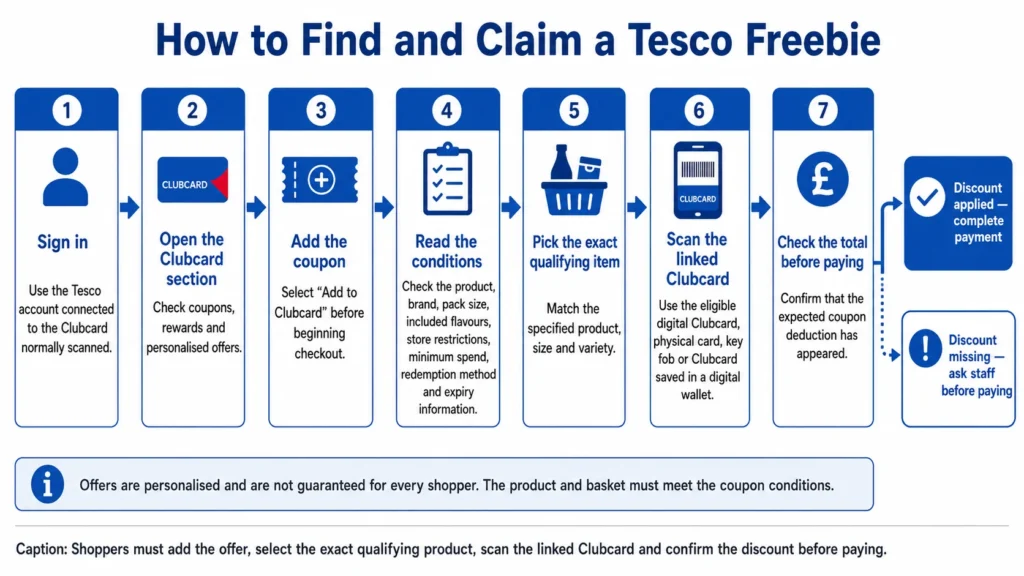
The Tesco Grocery & Clubcard app is one of the main places to check for free-product promotions and personalised discounts.
1. Sign in to Your Tesco Account
Open the app and sign in using the account connected to your Clubcard.
Make sure the Clubcard number shown in the app matches the card you normally scan when shopping. Offers may not appear correctly when a customer has more than one account or uses a different Clubcard.
2. Open the Clubcard Section
Select the Clubcard area of the app and look for coupons, rewards or personalised offers.
Available promotions may include:
- A completely free product
- A discount covering the full price of a selected item
- Money off a particular product
- Extra Clubcard points
- A discount when you spend a specified amount
A free-product offer should clearly identify the item and explain how the coupon must be redeemed.
3. Add the Coupon to Your Clubcard
Tap Add to Clubcard or the equivalent button shown beside the offer.
Adding the coupon links it to your Clubcard account. When you later scan that Clubcard at the checkout, Tesco can check whether your basket contains the qualifying product.
Add the coupon before starting the checkout process. Waiting until after your Clubcard has been scanned may prevent it from being applied to the transaction.
4. Read the Offer Conditions
Check the coupon details carefully before choosing a product.
Pay attention to:
- The product name
- Brand or product range
- Pack size
- Included flavours
- Store restrictions
- Minimum spending requirements
- Redemption method
- Expiry information
- Whether the offer is available online or only in-store
A product that looks similar may not qualify. For example, a coupon for one pack size may not work on a larger multipack or another flavour from the same range.
5. Pick the Exact Qualifying Item
Find the product specified in the offer and compare the label with the description in the app.
Check the size, variety and barcode information where necessary. Product ranges can contain several similar items, so selecting the wrong one is a common reason for a coupon not working.
If the qualifying product is unavailable, Tesco may not provide a replacement unless the promotion specifically permits substitutions.
6. Scan Your Clubcard at Checkout
Take the product to an in-store checkout and scan your Clubcard.
You can usually scan:
- The digital Clubcard in the Tesco app
- A physical Clubcard
- A Clubcard key fob
- A Clubcard saved in a digital wallet
When the coupon has been added correctly and the basket meets the conditions, the relevant discount should be applied during the transaction.
7. Check the Total Before Paying
Review the checkout screen or receipt to confirm that the discount has been applied.
The product may appear with its normal price followed by a separate coupon deduction. In some promotions, the discount may be distributed across several products rather than showing one item as completely free.
Ask a member of staff for help before completing the purchase when the expected discount does not appear.
Can Tesco Freebies Appear on Receipts?
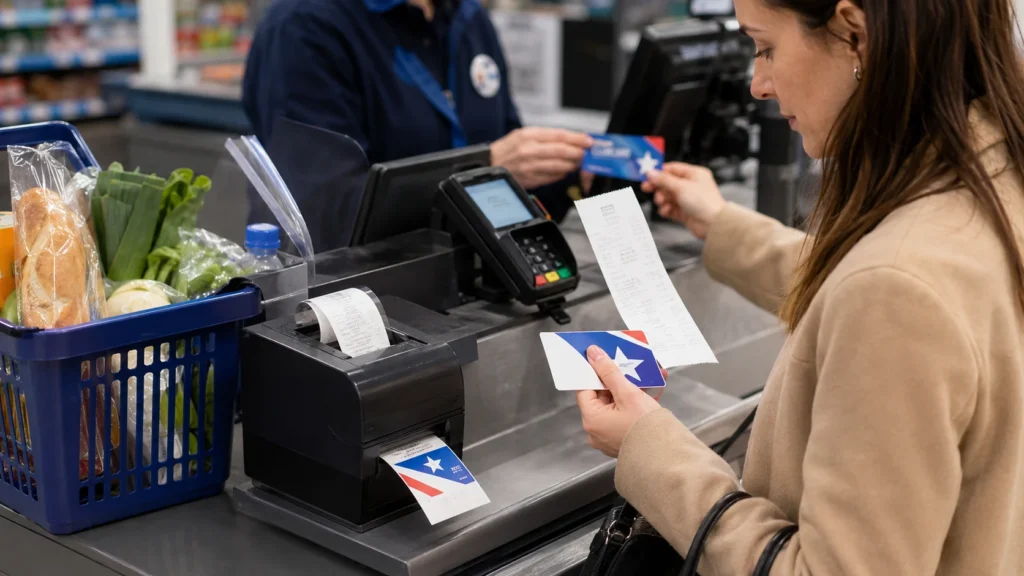
Tesco may issue personalised coupons when a Clubcard is scanned during an in-store transaction.
These can be printed with the receipt or provided as a separate paper coupon. Depending on the promotion, the coupon may offer:
- A free product
- Money off a selected item
- Extra Clubcard points
- A discount on a future shop
- A reward for reaching a spending threshold
Check all paper produced by the checkout before throwing it away.
A receipt coupon may need to be used during a later visit. Bring the original coupon, the linked Clubcard and the qualifying product to the checkout.
Do not assume that every receipt will contain an offer. Coupons are often personalised and may be issued only to selected shoppers.
Can Tesco Freebies Be Claimed at Self-checkout?
Many Clubcard coupons can be used at self-service checkouts, provided the coupon has been added to the correct Clubcard account and the basket meets the offer conditions.
Scan the qualifying product and then scan your Clubcard as instructed by the checkout.
A staff member may need to assist when:
- A paper coupon must be scanned
- The checkout does not recognise the offer
- The product requires approval
- The coupon conditions have not been met
- The discount has not appeared correctly
The coupon itself should state whether a staffed checkout is required.
How to Look for Tesco Samples Online?
Tesco may occasionally list promotional samples or trial products for online grocery customers.
When shopping through home delivery or Click+Collect, search for terms such as:
- Sample
- Free sample
- Trial product
- Promotional item
- Free with Clubcard
Check the product page and basket carefully. A search result does not necessarily mean the item is currently free or available in every delivery area.
Before placing the order, confirm that:
- The product is available in your area
- The promotional price appears in the basket
- You have met any spending requirement
- The offer applies to delivery or Click+Collect
- Your Clubcard is connected to the online account
Some free-product coupons are limited to physical stores and cannot be used for online grocery orders.
Are Tesco Freebie Thursdays Guaranteed?
No. Promotions described as Tesco Freebie Thursdays or similar app-based giveaways are generally limited offers rather than a permanent weekly entitlement.
A promotion may:
- Run for a limited period
- Be offered only to selected Clubcard members
- Include a different product for different customers
- Have limited stock
- Be available only in participating stores
- Require recent Clubcard or app activity
Check your own Tesco account instead of relying only on social-media posts. Another shopper receiving a freebie does not mean the same coupon will appear for everyone.
How to Improve Your Chances of Seeing Tesco Offers?
There is no guaranteed method for receiving a Tesco freebie, but keeping your account active may help ensure that you can see promotions for which you are eligible.
Useful steps include:
- Keep the Tesco Grocery & Clubcard app updated.
- Sign in to the correct Tesco account.
- Scan your Clubcard whenever you shop.
- Check the coupons section regularly.
- Review your communication and marketing preferences.
- Check Tesco emails before deleting them.
- Keep printed checkout coupons.
- Read each Tesco offer before travelling to a store.
Tesco can change how it selects customers for promotions, so regular Clubcard use does not guarantee that a free-product coupon will appear.
Are Faster Vouchers Tesco Freebies?
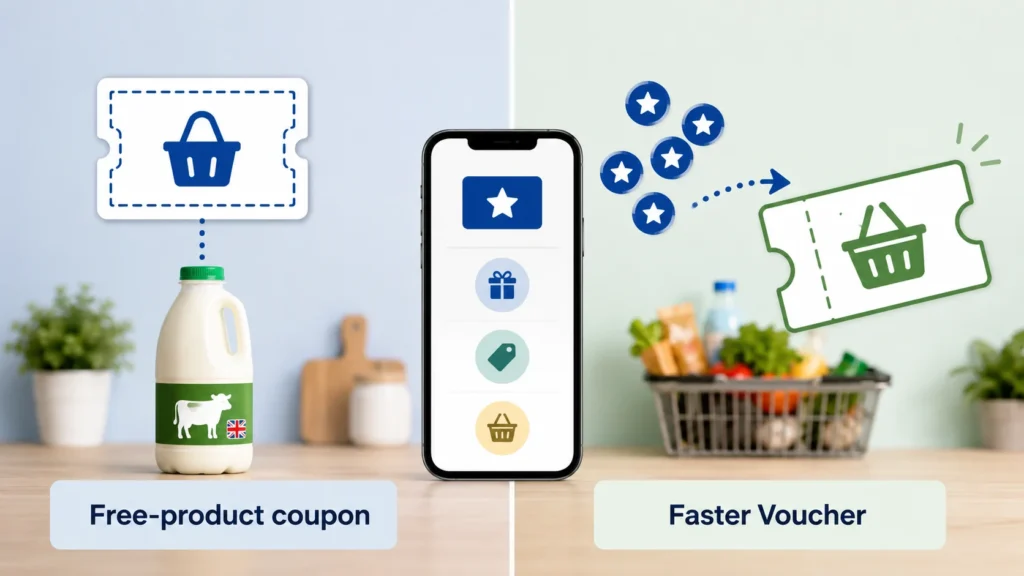
Faster Vouchers are not the same as Tesco freebies.
A free-product coupon gives an eligible customer a specific item without paying its normal price, provided the promotion conditions are met.
Faster Vouchers convert Clubcard points already collected through qualifying spending into vouchers that can be used towards purchases.
The main differences are:
| Clubcard benefit | How it works |
| Free-product coupon | Makes a specified product free when the conditions are met |
| Money-off coupon | Reduces the price of a product or basket |
| Clubcard Price | Gives members a lower promotional price |
| Clubcard voucher | Converts collected points into spending value |
| Faster Voucher | Allows eligible points to be converted before a regular statement |
Faster Vouchers can still reduce the amount you pay, but they are based on points you have already earned rather than a separate free-product promotion.
Why is My Tesco Freebie Not Working?
A Tesco coupon may fail for several reasons.
The Wrong Product Was Selected
Check the brand, flavour, pack size and product range. Even a small difference can make an item ineligible.
The Coupon Was Not Added
Some digital offers must be actively added to the Clubcard before checkout.
The Coupon Belongs to Another Account
The coupon may be linked to a different Clubcard, even when members of the same household share shopping responsibilities.
The Offer Has Ended
Free-product coupons are usually valid for a limited period. Check the offer information in the app or on the printed coupon.
The Promotion is Limited to a Particular Shopping Method
An in-store coupon may not work online, while an online promotion may not be recognised at a physical checkout.
The Spending Conditions Were Not Met
Some offers require a minimum basket value or the purchase of another qualifying item.
The Product is Unavailable
Freebies are normally subject to stock availability. A different product may not be accepted as a substitute.
When the terms appear to have been met, keep the receipt or take a screenshot of the coupon and contact Tesco customer support.
How to Avoid Problems When Claiming a Tesco Freebie?
Before visiting the checkout:
- Add the coupon to your Clubcard.
- Check that it is still valid.
- Select the exact product shown.
- Confirm whether it is an in-store or online offer.
- Read any minimum-spend conditions.
- Use the Clubcard linked to the coupon.
- Check the discount before paying.
Taking a screenshot of the offer can also be helpful if the coupon disappears from the app or does not apply correctly.
Frequently Asked Questions
Do I need a Clubcard to claim Tesco freebies?
Most Tesco freebies offered through personalised coupons require a Clubcard. The offer is normally linked to a specific account and applied when that Clubcard is scanned.
Does every Tesco Clubcard member receive freebies?
No. Tesco may send offers only to selected customers. Promotions can be personalised according to account activity, shopping behaviour or individual campaign rules.
Where can I find Tesco free-product coupons?
Check the coupons section of the Tesco Grocery & Clubcard app, Tesco emails, postal Clubcard communications and any paper printed with an in-store receipt.
Can I use a Tesco freebie coupon online?
Only when the offer conditions permit online redemption. Some promotions are restricted to in-store purchases, while others may work with home delivery or Click+Collect.
Can I use a Tesco freebie at self-checkout?
Many digital Clubcard coupons can be applied at self-checkout. Scan the qualifying item and the linked Clubcard, then confirm that the discount appears before paying.
What happens if the free product is out of stock?
A replacement is not normally guaranteed. Check another participating branch or wait to see whether the product becomes available before the coupon expires.
Can someone else use my Tesco freebie coupon?
The coupon is usually linked to the Clubcard account that received it. Another person may be able to redeem it only when using the same eligible Clubcard and complying with the promotion conditions.
Are Tesco receipt coupons always for free products?
No. Receipt coupons may offer a free item, extra points, money off a product or a discount on a future purchase.